Preferred resolution
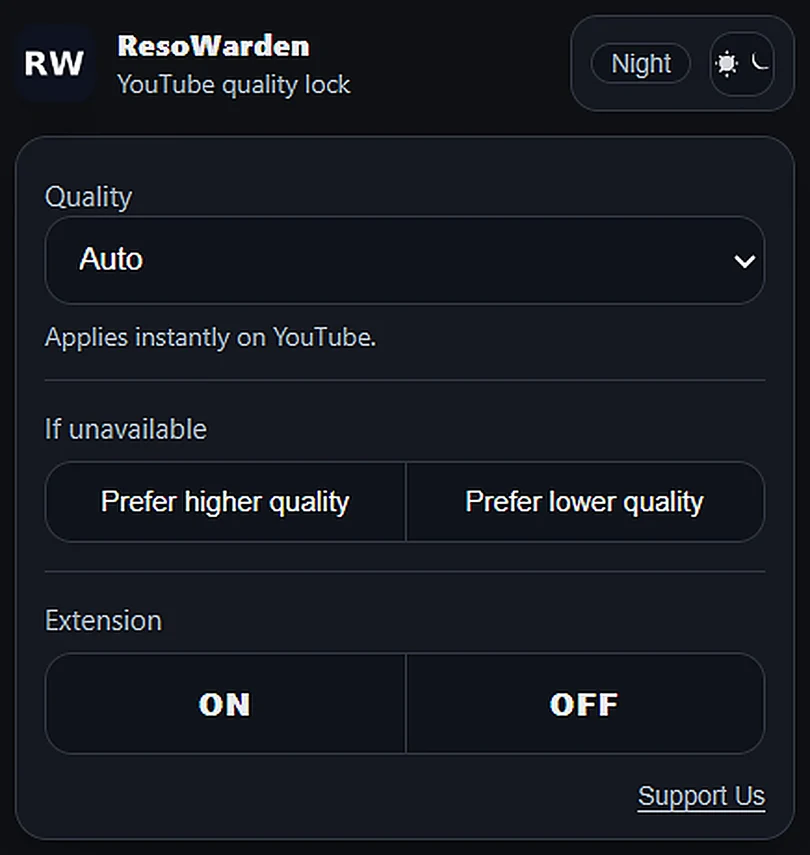
Pick Auto, 144p, 360p, 720p, 1080p, 1440p, 2160p, or the quality you actually want for each session.
Set once ResoWarden
 Add to Chrome
Chrome extension for YouTube
Add to Chrome
Chrome extension for YouTubeSet it once. ResoWarden keeps your YouTube quality locked.
Core features
Set the rule once. ResoWarden watches the YouTube player for you and keeps the viewing experience consistent without extra clicks.
Pick Auto, 144p, 360p, 720p, 1080p, 1440p, 2160p, or the quality you actually want for each session.
Set onceWhen YouTube does not offer your exact choice, ResoWarden can prefer the nearest higher or lower available quality.
No dead endsA compact extension panel lets you change quality, theme, fallback behavior, and on/off state in seconds.
Lightweight UIResoWarden focuses on one job: keeping YouTube quality consistent while keeping settings inside the browser.
Quality, theme, fallback, and enabled state stay in Chrome extension storage.
The extension works without sign-in, onboarding gates, or external dashboards.
Fallback is explicit, so users understand what happens when a quality is unavailable.
Automatic by design
The extension works in the background on supported YouTube pages, reads the available player options, and applies your saved rule instantly.
Why it hits harder
ResoWarden turns a repetitive manual action into a simple saved preference, especially useful for long sessions, playlists, background listening, and Shorts scrolling.
No more opening the player quality menu over and over.
Works with both standard videos and Shorts pages.
Fallback behavior is explicit, not guessed.
Clean theme-aware popup, no account needed.
How it works
Install ResoWarden from the Chrome Web Store and pin it for quick access.
Select your preferred quality and decide whether fallback should go higher or lower.
Open YouTube videos or Shorts. ResoWarden applies your setting automatically in the background.
Privacy-first
ResoWarden stores settings in Chrome extension storage and does not require an account. It is focused on YouTube quality control, not tracking you around the web.
FAQ
Yes. ResoWarden is designed for both regular YouTube videos and YouTube Shorts.
You choose the fallback behavior. ResoWarden can prefer the nearest higher quality or the nearest lower quality when the exact option is not present.
Yes. The popup includes an ON/OFF control so you can pause the extension whenever you want.
Use the support page to send feedback, report a bug, or request a feature.
Install ResoWarden and let the extension handle the repetitive quality switching for you.